Windows
A focused workstation experience
Use Alfa Gold from a Windows workstation for keyboard-led entry, business reporting and supported printing workflows. Ask our team which desktop version fits your installation.
Discuss your setup ↗
ALFA GOLD / Jewellery management software
From the counter to your accounts. Connect jewellery trading, stock, barcodes and reporting across the Alfa Gold Windows, Android and browser experience.
ACTUAL ALFA GOLD / CLOSING STOCK
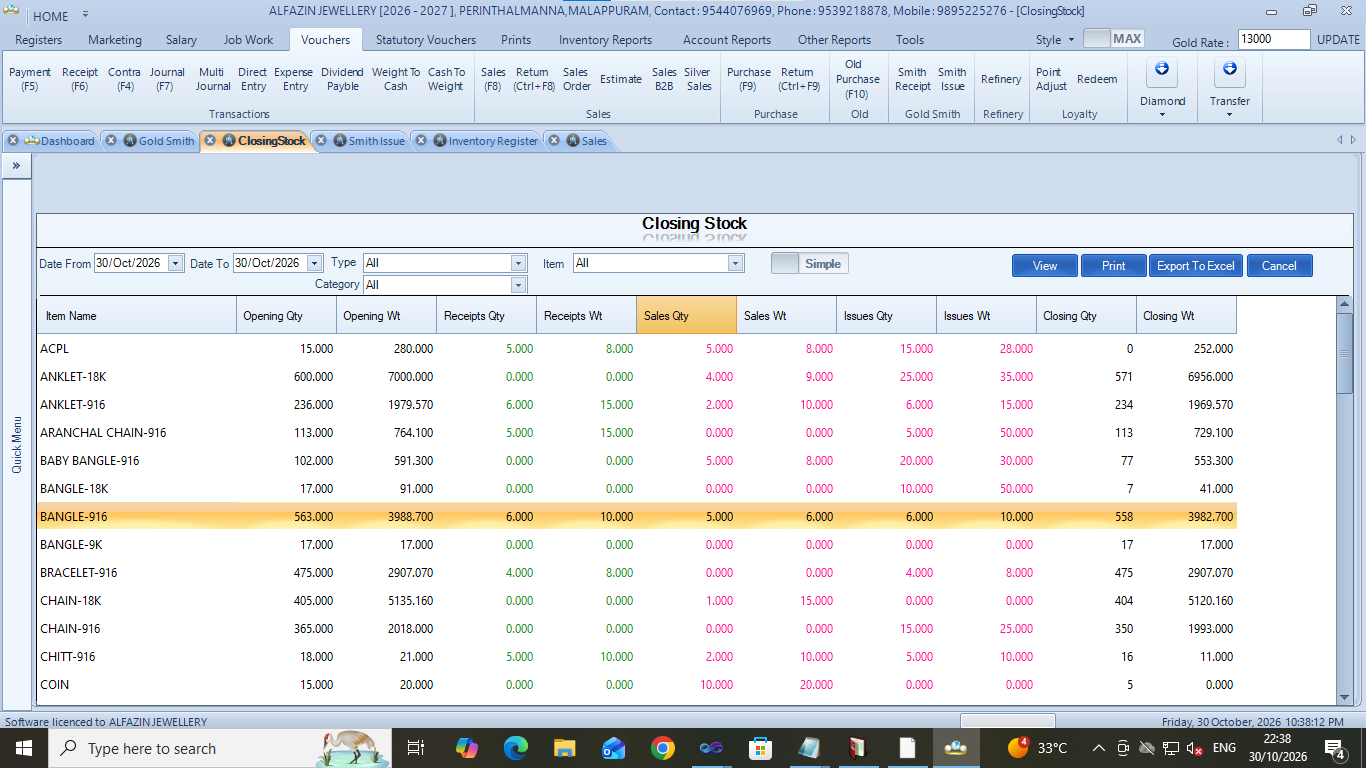 Windows stock reporting / Explore the report below ↓
INSIDE ALFA GOLD / WINDOWS
Actual screens supplied by Alfazin. Customer and patient details are redacted where shown. Screens and options vary by version and configuration.
Follow opening stock, receipts, sales, issues and closing balances by item, with separate quantity and weight columns. Filter by date, type, category and item, then print or export to Excel.
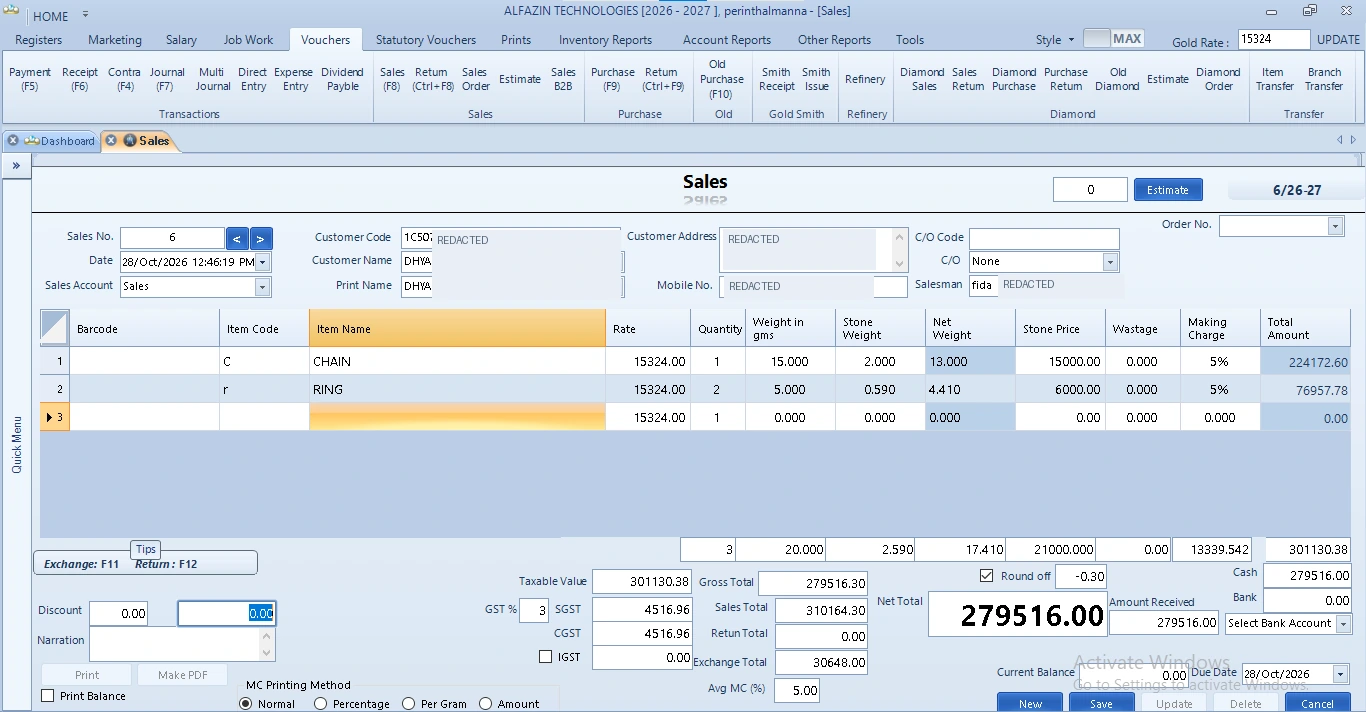
Jewellery sales with weights, stone details, making charges, tax and settlement in one transaction window.
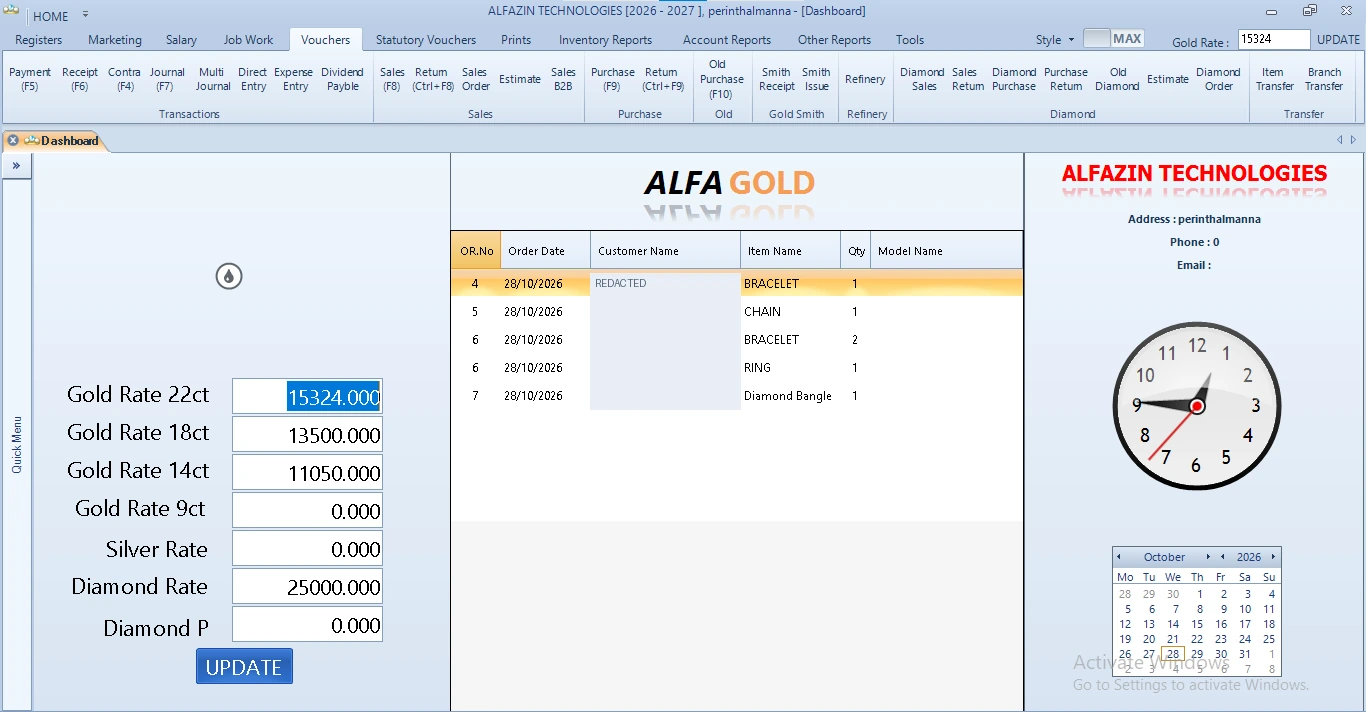
Gold-rate controls, order overview and shortcuts to everyday jewellery workflows.
ONE BUSINESS. DIFFERENT WAYS TO CONNECT.
Choose the access that suits your team. Available workflows depend on the version, enabled modules, permissions and connected company database.
Windows
Android
Web
iPhone & iPad
MORE THAN A SALES SCREEN
Connected workflows for the people at your counter, in your stockroom and behind your accounts.
Sales and purchases, sales and purchase returns, estimates, sales orders and old-gold purchase workflows. Jewellery entry includes weight, making charges, stones, tax, discounts and settlement details.
Item and category registers, bulk barcode entry, item photographs, barcode/QR lookup and configured label printing. Stock and item-wise reports help follow the movement behind the numbers.
Cash receipts, cash payments, contra and journal vouchers. Allocate full or partial amounts to pending invoices and review opening and closing balances, debtors and creditors.
Gold and diamond sales and purchase reports, old-gold and old-diamond purchases, smith issue and receipt, smith ledger, stock, weight books, daybook and cashbook. Accounting includes trial balance, profit and loss and balance sheet.
Customise logos, business details, columns, footer, margins and paper size. Invoice layouts include A4, A5 and 80 mm, with live layout preview, PDF output and support for preprinted stationery workflows.
Switch company and financial year from the dashboard. Company administrators manage user access and view, save, edit and delete permissions. Available forms and licence allocation are controlled per company.
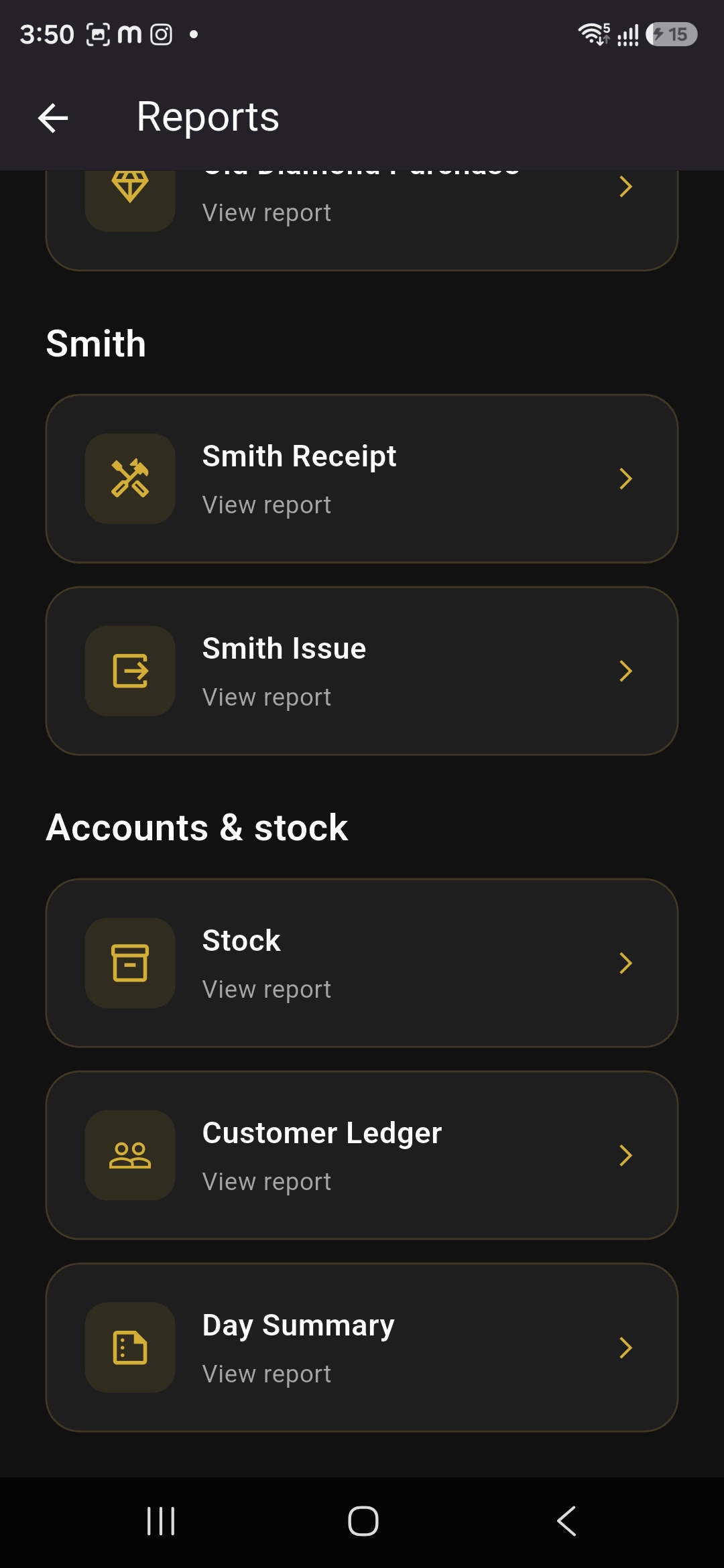
FROM THE APPLICATION ITSELF
A searchable report hub brings sales, purchase, smith, accounts and stock information into a structured workspace.
Filter reports for the period you need, explore the available company data, and use supported print and export options to take the next step. Dashboard summaries, sold-weight views and rate history help put the detail in context.
Walk through your reports with us ↗The image shows a captured Android report menu. Features vary by application version and company configuration.
MADE FOR YOUR EVERYDAY
Alfa Gold supports jewellery trading, inventory, barcodes, customer and supplier accounts, reporting and configured business workflows. Windows, Android and web versions have different feature availability.
See how Alfa Gold fits your team’s requirements in a guided demonstration, focused on the work you do every day.
A CONNECTED WORKFLOW
The details of your business,
brought into focus.
THE DETAILS THAT MAKE A DIFFERENCE
Gold, diamond and silver trading workflows in the Windows product include sales, purchases, returns, B2B sales, orders and estimates.
Work with gross/net weights, stones, making charges, HUID details, barcodes and item photographs in the supported workflows.
The Windows application includes smith receipt, issue and payment workflows, refinery operations and related reports.
Review ledgers, full or partial invoice allocations, cash flow, debtors, creditors, weight books and financial statements.
Company and financial-year switching, user access and role permissions support authorised team workflows.
Configured invoice layouts, print/export options, bulk barcode records and supported label printing help connect entry with output.
WHY ALFA GOLD
Connect sales and purchase workflows with stock, receipts, payments and the reports behind your jewellery business.
Use the Windows, Android or browser experience suited to your team, with the appropriate company connection and permissions.
Review jewellery-specific weights, stones, rates and making charges through the workflows supported by your edition.
A FEW THINGS TO KNOW
Alfa Gold supports jewellery trading, inventory, barcodes, customer and supplier accounts, reporting and configured business workflows. Windows, Android and web versions have different feature availability.
Yes. Request a demo and tell us about your business. Our team can walk you through the relevant workflows and answer your questions.
Use our enquiry form to share your requirements. Ask the team about pricing, deployment, onboarding and support for your setup.
Yes. Alfa Gold has an Android application. Windows and browser versions are also part of the product family. iPhone and iPad users can use the web application; ask the team about native iOS availability.
ALFA GOLD / WINDOWS. ANDROID. WEB.
Our updated application brings everyday jewellery workflows, reporting and authorised company access to desktop, mobile and browser experiences.
Search the report menu, filter by period and review stock, customer ledgers, sales, purchases, smith activity and financial statements in the supported version.
Find the item behind a barcode or QR code, view configured item details and photographs, and work with weights, stones, making charges and HUID information where supported.
Work with enabled sales, purchase, return, receipt, payment, journal and other voucher forms. Available entry and editing options depend on the version and permissions.
Use voucher-specific layouts for sales, diamond and B2B documents, and separate receipt/payment designs. Supported layouts include A4, A5 and 80 mm, with PDF and print workflows.
Switch between authorised companies and financial years. Company administrators manage users, roles and the view, save, edit and delete permissions available to each team member.
Use Windows at the workstation, Android on the move and the connected web application in a browser. Review the features needed on each device in your demonstration.
ALFA GOLD / GCC EDITION
Alfa Gold is available in a GCC edition. Alfazin Technologies also provides ZATCA e-invoicing solutions for Saudi Arabia. Talk to our team about your country, business workflow and the regional invoice configuration you need.
ZATCA requirements relate to Saudi Arabia. Regional features depend on the selected software edition and configuration.ALFA GOLD / WEIGH. LABEL. SCAN.
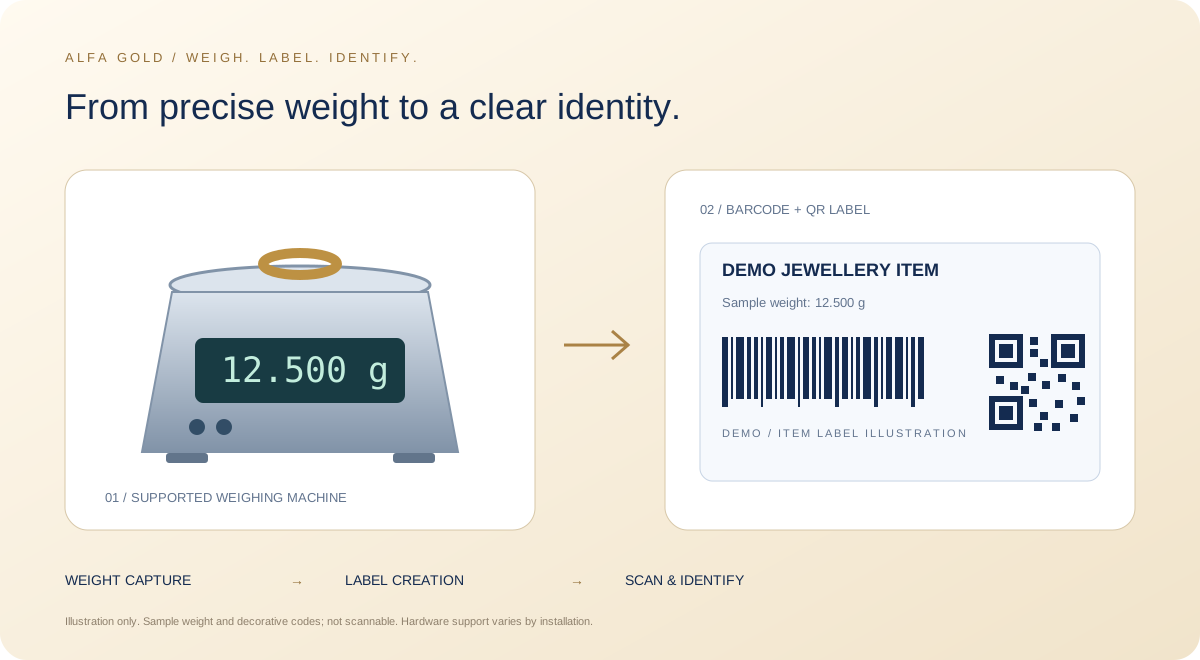
Alfa Gold supports weighing-machine-integrated barcoding and QR-code workflows. Connect the item, its weight and its label as part of a configured jewellery workflow.
Use supported weighing-machine integration when preparing item and label details, helping reduce repeated manual weight entry.
Create and use barcode or QR-code labels with the configured jewellery item details, including the relevant weight information.
Scan the configured label to retrieve item information for supported sales and stock workflows.
Workflow illustration. Supported weighing-machine models, printers, scanners and available functions depend on the selected version and installation.
YOUR BUSINESS. YOUR NEXT CHAPTER.