Purchase-bill import
Import supported purchase-bill files, map the products and review item, batch and rate details before posting. Reduce repeated entry when bringing supplier or customer-provided bill files into your pharmacy workflow.

ALFA MED / PHARMACY. CLINIC. LABORATORY.
From the doctor’s prescription to the pharmacy counter. From OP/IP registration to laboratory results and accounts. Alfa Med brings the work around your patients into focus.
ONE CONNECTED WORKSPACE
THREE EDITIONS. YOUR COMBINATION.
Choose Alfa Med for a pharmacy, clinic or laboratory separately. Combine the modules in one installation when you need one database and a shared set of accounts.
Purchases, prescriptions, sales, repeat billing, batches, expiry and stock.
Explore Pharmacy ↗02 / CLINICOP/IP records, appointments, doctor workflows, patient summaries and billing.
Explore Clinic ↗03 / LABORATORYTest setup, lab billing, result entry, technician passwords and reports.
Explore Laboratory ↗ALFA MED / PHARMACY EDITION
Connect the medicine list, the stock you hold and the bill you create. Use pharmacy software shaped around everyday counter work.
Import supported purchase-bill files, map the products and review item, batch and rate details before posting. Reduce repeated entry when bringing supplier or customer-provided bill files into your pharmacy workflow.
Load a prescription from the doctor workflow directly into pharmacy billing. Bring the prescribed items into the billing process and select the appropriate available batches.
Find a previous bill using bill number, patient name, place or doctor, or a combination of the supported search fields. Reuse its medicine list, select the current batches and review the new bill before saving.
Identify patients whose prescriptions have not become medicine purchases. Give the team a practical follow-up view alongside the patient and prescription records.
Review available stock, batch and expiry details, reorder levels, fast- and slow-moving items and branch movements. Keep purchasing and counter decisions connected to stock information.
Sales, purchases, returns, receipts, payments, ledgers and financial reports keep the pharmacy connected with the wider accounts in a combined installation.
ONE FIELD OR A COMBINATION
THE RE CREATE ADVANTAGE
For a returning patient, the earlier bill provides a useful starting point. Search using the details you have, bring the items back into the billing workflow and choose the current stock batches.
The team still reviews the items, quantities, prices and patient details before creating the new bill.
Try Re Create in a demo ↗ALFA MED / CLINIC EDITION & DOCTOR PORTAL
Bring registration, doctor consultation, prescriptions, IP/OP billing and patient-history review into a coordinated clinic workflow.
Manage outpatient and inpatient registration alongside appointments and booking records. Keep the patient identity connected to the visit and the next stage of care administration.
Use doctor consultation and prescription workflows, then make the prescription available to the pharmacy in a connected installation. Reduce the need to type the medicine list again at the counter.
Handle inpatient billing and review the patient summary, consultation history, prescriptions and related records. Follow the information behind each visit and bill.
Track patients who left without purchasing their prescribed medicines. Use that visibility for appropriate follow-up and to understand the link between consultations and pharmacy purchases.
Connected-workflow illustration. Doctor portal access and module availability are configured for each installation.
ALFA MED / LABORATORY EDITION
A laboratory workspace for patient-linked billing, tests, result entry and reporting, with individual technician password options.
Configure separate password access for technicians in supported laboratory workflows. Link the staff identity with lab billing and result records.
Organise test registers, groups, categories and formula settings. Enter results with units and normal ranges, and use the laboratory’s supported print and reporting options.
Keep laboratory billing, result reports and item-wise views together. Connect the lab to the shared accounts when it is part of a combined Alfa Med setup.
SEPARATE EDITIONS. ONE CONNECTED INSTALLATION.
Run Pharmacy, Clinic or Lab separately, or combine the services your organisation needs. In a combined installation, one database keeps the modules connected and brings their financial activity into a common accounting workspace.
Plan your configuration ↗Available modules, import formats, search fields, doctor access and integrations depend on the selected edition and installation. Our team will demonstrate your required combination.
INSIDE ALFA MED / WINDOWS
Actual screens supplied by Alfazin. Customer and patient details are redacted where shown. Screens and options vary by version and configuration.
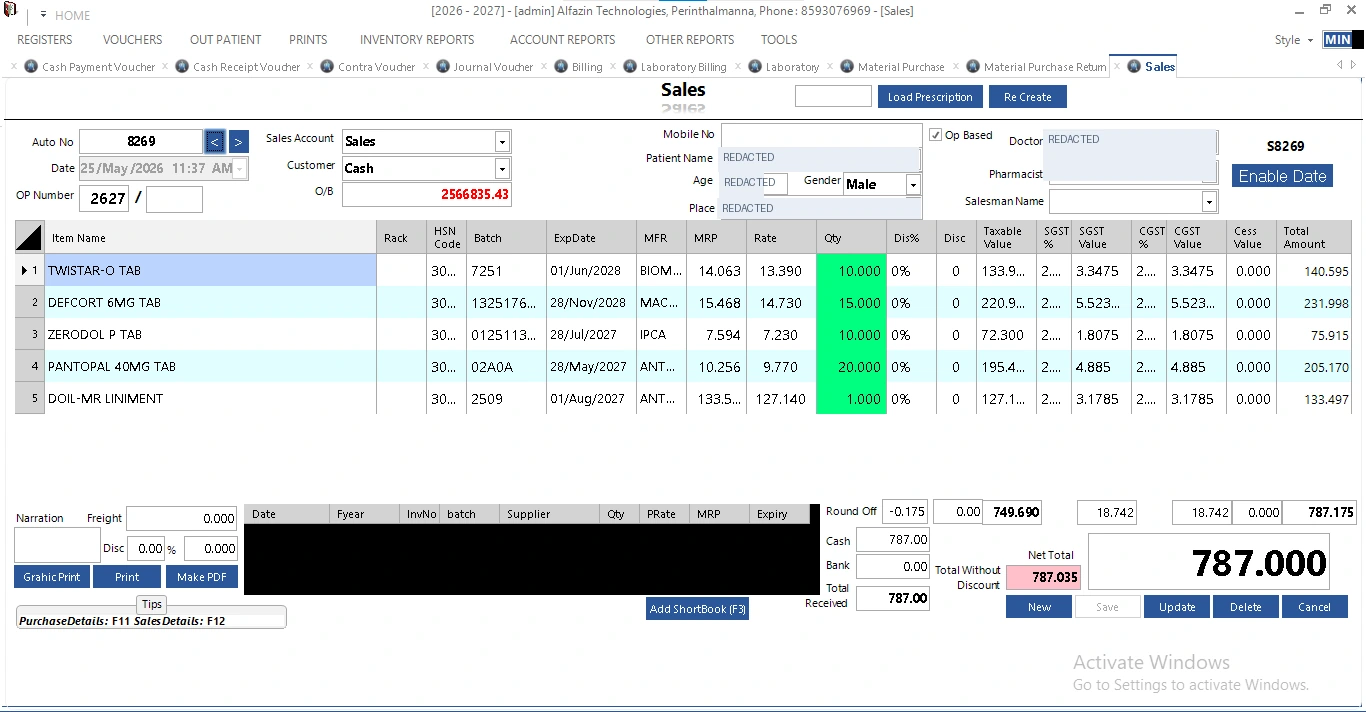
Pharmacy billing with item batches, expiry dates, quantities and tax calculations.
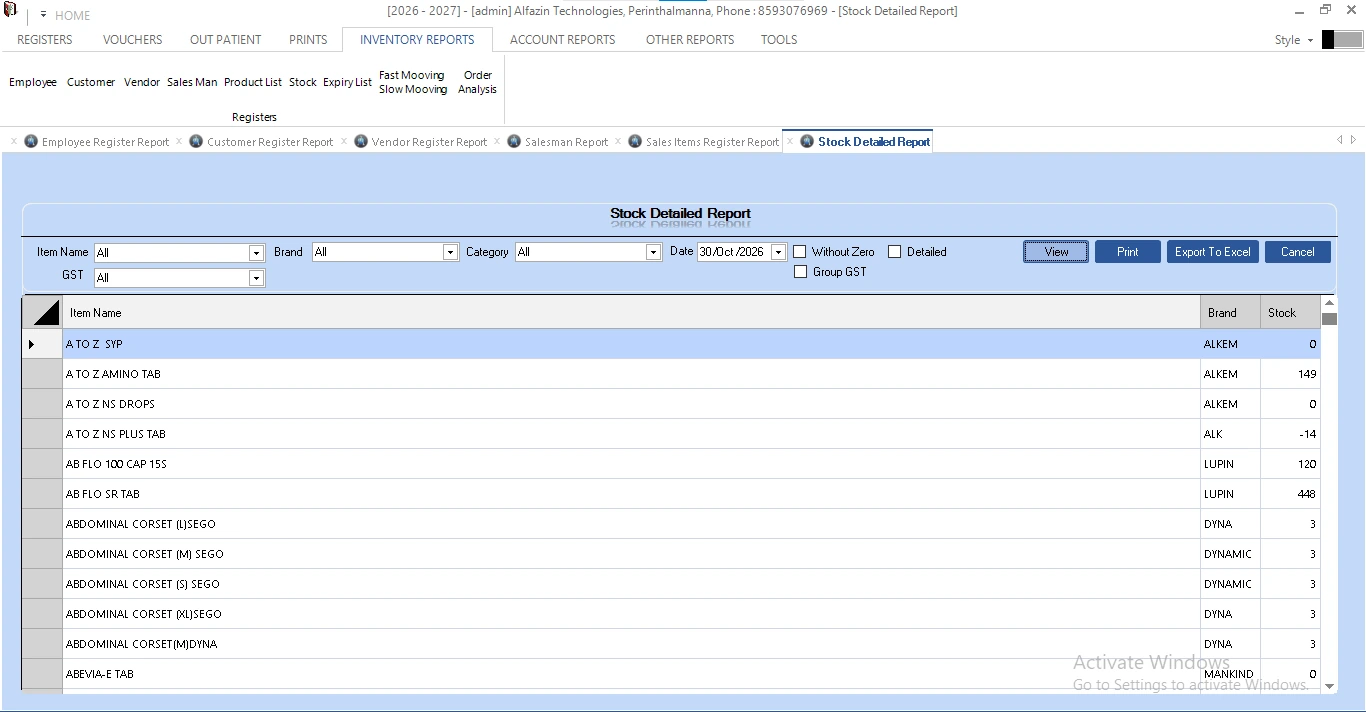
Review pharmacy stock by item, brand and category, with options to print or export.
YOUR WORKFLOW. YOUR ALFA MED.